Help / Shape mode: the grid
Shape mode: the grid
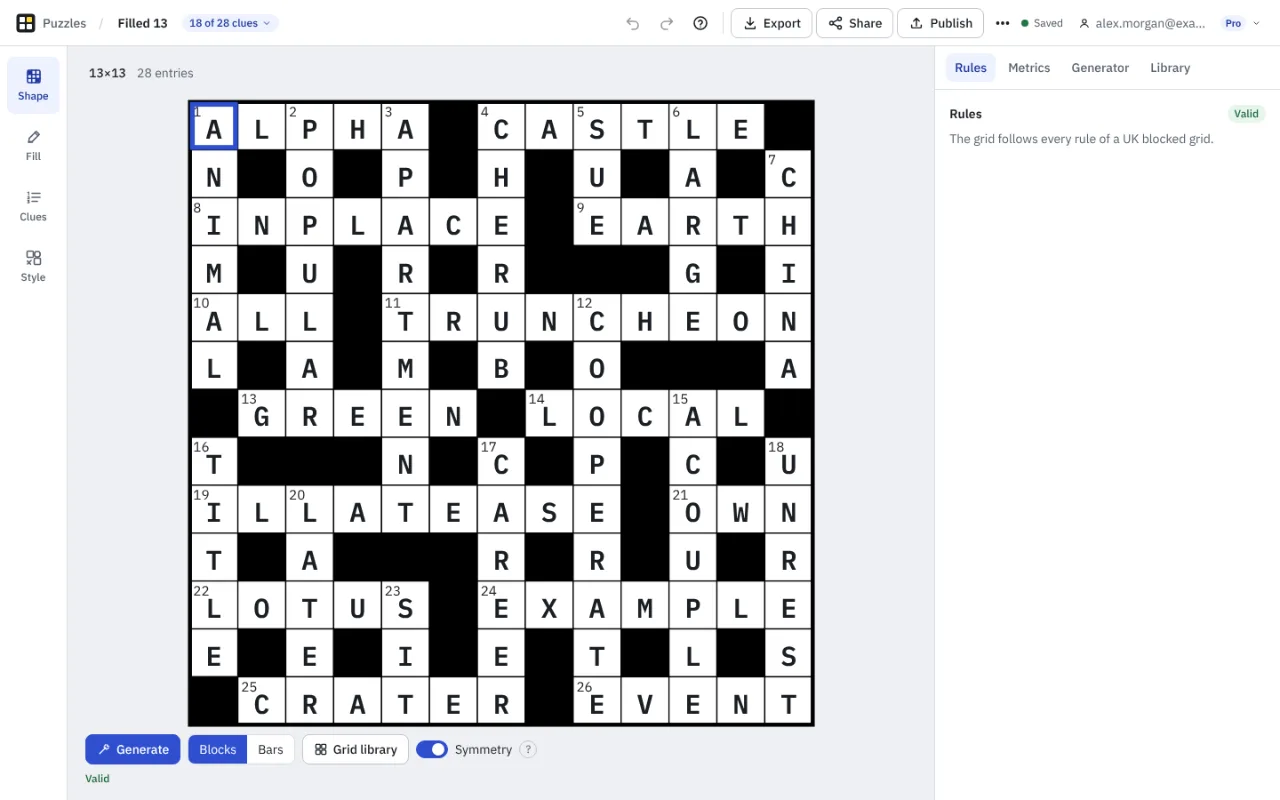
Draw a grid or generate one, and see at once whether it follows the rules of a UK blocked grid.
Draw the grid
Click a square to switch it between a block (black) and a light (white). With the Symmetry switch on, which is the default, its partner half a turn round the grid changes too, so the pattern stays the same when turned upside down. Switch Symmetry off for a grid that is not symmetrical.
From the keyboard, move with the arrow keys and press Space or Enter to switch the square you are on. The grid says which row and column you are in.
Changing the shape never loses work by accident. If a change would turn squares that hold letters into blocks, Crossmith lists the letters and asks first, and Undo brings them back.
Generate a grid
Generate redraws the grid, keeping any squares you have locked: turn on Lock mode in the Generator tab, then click squares, or use the arrow keys and Space, to lock or unlock them. The Generator tab shows a gallery of twelve grids with scores as they are found, and you can open one in the editor. The generator makes odd sizes from 7 to 23 squares each way.
Free includes 10 grid generations a day, after which Crossmith reminds you and carries on. Pro has no limit. See Free and Pro.
The Rules tab
The Rules tab shows Valid when the grid follows every rule of a UK blocked grid, and otherwise lists each problem in plain words. Point at a problem to see its squares on the grid. The rules are:
- the grid is between 5 and 27 squares each way;
- the block pattern looks the same when turned half a round (the usual convention; you can choose another symmetry or none in Options);
- every light can be reached from every other, so no part of the grid is cut off;
- every light belongs to an answer;
- no answer is shorter than three letters;
- no two unchecked letters are side by side in an answer (glossary: unch);
- every answer has at least half its letters checked.
Warnings and Metrics
Quality warnings are listed apart from the rules. They are not errors: they say when something is unusual compared with published grids, such as a very large share of blocks, or two by two squares of blocks. The Metrics tab counts blocks, answers, lengths and unchecked letters.
Fill and Clues modes are not available while the grid breaks a rule. Crossmith says why and takes you back to the rule to fix.
The grid library
The Library tab holds ready-made patterns and your own saved grids. Pick one to use it as the shape of your puzzle. Pro setters can also use barred patterns (Barred grids).
Something missing or wrong? Write to hello@crossmith.com.