Help / Clues mode: writing the clues
Clues mode: writing the clues
Write a clue for every answer, with a dictionary, thesaurus and wordplay tools beside you.
Before you start
Clues mode opens once every light has a letter. If some squares are empty, Crossmith says how many and offers to take you back to Fill.
Write a clue
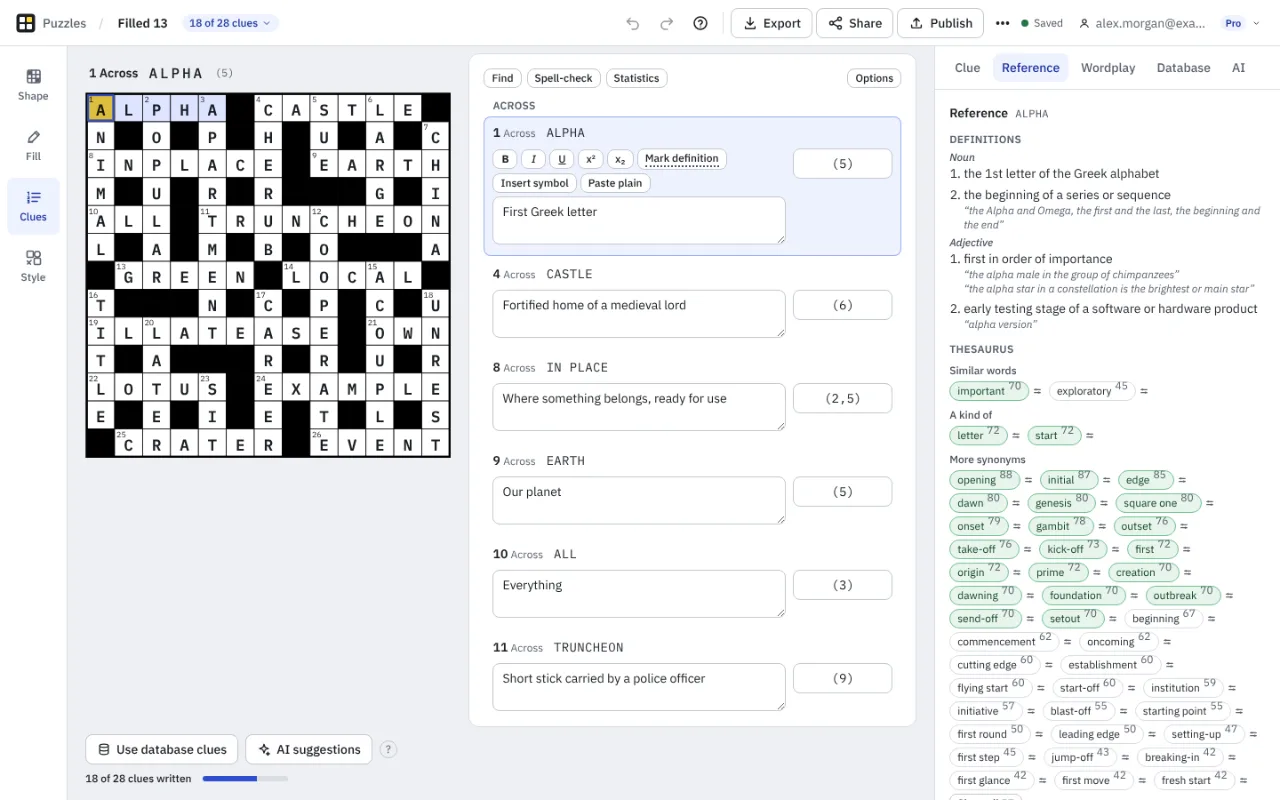
Each answer has a box for its clue and one for its enumeration, the number in brackets such as (3,5). Crossmith works the enumeration out from the word list and you can type over it. Press Tab or Enter to go to the next clue, and Shift+Tab to go back. Clicking a square in the grid takes you to its clue.
The progress line under the grid says how many clues are written and how many need a look. A clue is flagged if it contains its answer or a form of it, and an answer you changed later is flagged until you say the clue is still fine.
Format and explain
Use the buttons above a clue for bold, italic, underline, superscript and subscript, or press Ctrl+B, Ctrl+I and Ctrl+U. Mark definition underlines the definition for you only, and Insert symbol adds characters. Pasting keeps only formatting Crossmith allows; Ctrl+Shift+V pastes plain text. Every clue also has an explanation, for annotated solutions, and private notes that are never exported.
Part of another answer makes a clue into a reference such as See 14, with the combined enumeration on the main clue.
The inspector's tabs
- Clue: details of the clue you are in.
- Reference: definitions by part of speech, with examples, and a thesaurus of synonyms, similar words and broader words, from Open English WordNet and the Moby thesaurus. Click a word to put it into your clue. Each word shows its score in the word list.
- Wordplay: tools for cryptic clues, which find anagrams, hidden words, reversals, charades and containers, deletions and homophones for the selected answer or for letters you type, plus lists of abbreviations and indicator words (glossary). A click puts a template into the clue box for you to edit.
- Database and AI: your own clue database and suggestions (Clue database and AI).
Find, spell-check and statistics
Find opens a search of every clue, with replace (Ctrl+F opens it). Spell-check uses British spelling, your own word lists and a personal dictionary that stays with the puzzle; nothing is sent to a server. Statistics counts the clues written, the words in a clue, the longest clues, clues over a length you set, clues without a definition mark or an explanation, and theme entries. Options sets how clues are displayed in print and in the player.
If you change an answer
If you change an answer in Fill mode, the clue you wrote is kept but marked, and if the new answer is quite different the clue moves to a holding area rather than being lost. It comes back if the answer returns.
Something missing or wrong? Write to hello@crossmith.com.