Help / Barred grids
Barred grids
Make puzzles divided by bars rather than black squares, with their own rulebook, patterns and generator.
What a barred grid is
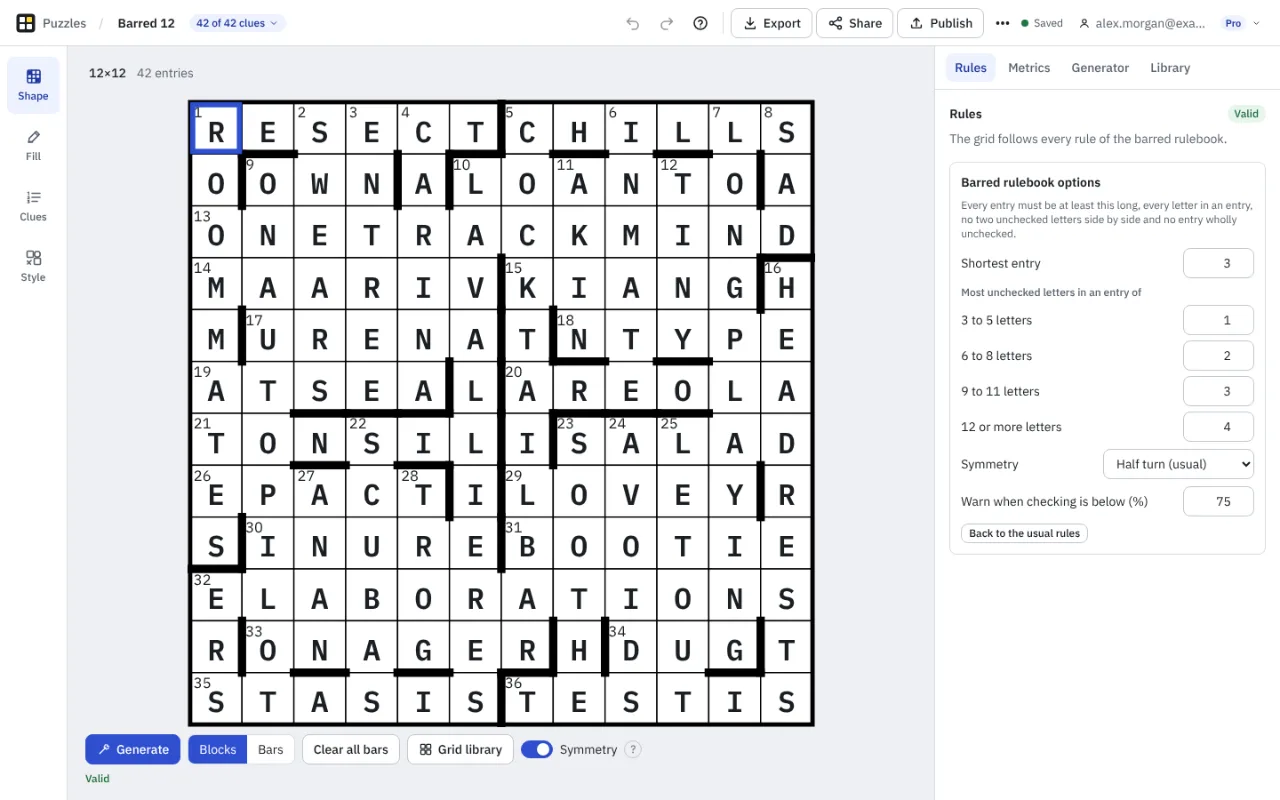
In a barred grid the answers are separated by thick lines between squares instead of black squares. Nearly every square is white, so answers can be longer and there are more unchecked letters (glossary: barred grid).
Make one
- Start a puzzle and choose a barred pattern in the wizard, or open the Library tab in Shape mode and pick a barred pattern. The library has patterns from 10 by 10 to 15 by 15.
- In Shape mode choose Bars to put bars on or take them off: click or tap near the edge of a square, or double-click a line. With the keyboard, press Alt and an arrow key to put a bar on that side of the square in focus.
- Symmetry applies to bars as it does to blocks. Clear all bars removes every bar.
- Generate makes barred patterns. The size runs from 7 to 19 squares each way.
The barred rulebook
A barred grid has its own rules, shown in the Rules tab with options you can change: the shortest entry (three letters by default), the most unchecked letters allowed in an entry of each length, the symmetry, and the level of checking below which Crossmith warns you. Some rules stay on: every light belongs to an answer, no two unchecked letters are side by side, and no answer is wholly unchecked.
Rare words are on by default for barred puzzles, because longer answers are harder to fill from common words only.
Printing, exports and playing
Bars are drawn in print, PDF and Word, images, the web player and published pages, and are kept in .ipuz and Crossword Compiler XML. The .puz format cannot hold bars, so Crossmith will not write a barred puzzle as .puz. A barred puzzle has a preamble in Details: formatted text that shows above the clues.
New barred puzzles are part of Pro. Barred puzzles you already have always open, edit, print and sync, on any plan (Free and Pro).
Something missing or wrong? Write to hello@crossmith.com.